| Location: > Support > Eudora 4.x Script Site Map |
This is a script to report a selected message, group of messages,
or open message as spam by creating, from the active account, a new message addressed to
abuse@deepskytech.com
including the content (with the long header) and subject line of the spam message.
Then the message is queued, the new message is sent the next time a connection is made.
Click here
to download Spam-Reporting Scripts for Eudora 4.x
The following example was done using Eudora 4.x on MacOS X, running under Classic.
To install this script with Eudora 4.x, follow these instructions.
First, you will have to download a small file that will allow you to have a script tab on your screen. To do this, click HERE This file was obtained from Lazerware.
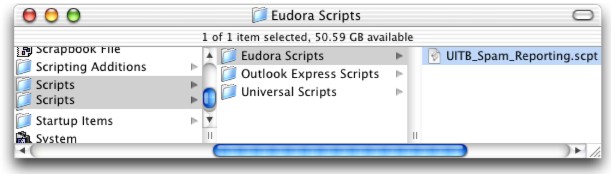
Open Eudora, and click on the script tab located at the top right of the screen. Click on the "Eudora Scripts" folder, and drag the script into that folder. Drag the script from the desktop into the following folder:
| MacHD --> System Folder --> Scripts --> Eudora Scripts |
As illustrated below:
Choose the script form the menu bar. You should see the spam script right there! As also seen in the above picture.
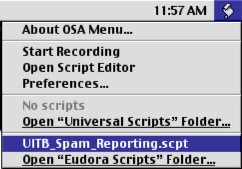
Select the spam messages in the listing window that you want to report as spam, then run the script. You can also run the scrip when the spam message is open.